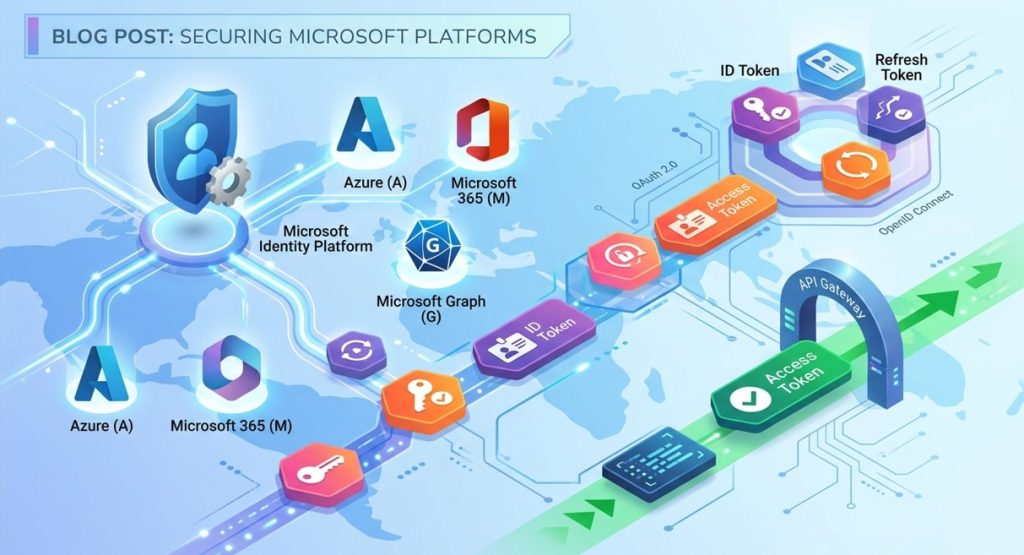
If you’ve spent any time building apps for Azure, integrating with Microsoft 365, or locking down corporate infrastructure, you’ve undoubtedly run into tokens.
In the modern cloud era, tokens are the invisible glue holding authentication and authorization together. Gone are the days of hardcoding database credentials or passing usernames and passwords back and forth with every API request. Today, Microsoft’s ecosystem anchored by Microsoft Entra ID (formerly Azure AD) and the Microsoft identity platform relies entirely on security tokens.
Let’s break down what tokens are, how they work across Microsoft platforms, and the best practices for handling them securely.
The Big Three: Understanding Microsoft Token Types
When interacting with Microsoft Entra ID, you’ll typically encounter three main types of tokens. Each serves a distinct purpose in the OAuth 2.0 and OpenID Connect (OIDC) protocols:
1. Access Tokens
What they do: They act as a secure “pass” that client applications use to call protected web APIs (such as Microsoft Graph, Azure management APIs, or your own custom backend services).
The Format: Usually structured as JSON Web Tokens (JWTs), containing “claims” (statements about the user, the app, and permissions).
Golden Rule: Client apps should treat access tokens as opaque strings meaning you shouldn’t try to parse or decode them on the client side. Only the resource (the API) intended to receive the token should validate and read it.
2. ID Tokens
What they do: Used primarily in OIDC flows by client web applications to prove that a user has successfully authenticated.
What’s inside: They contain basic profile information about the user (like name, email, and tenant ID) so the app can display UI elements or establish a local session.
3. Refresh Tokens
What they do: Because access tokens are intentionally short-lived (usually lasting around 1 hour) for security reasons, refresh tokens are used to acquire a new access token without forcing the user to log in again.
Security Note: Refresh tokens have a longer lifespan and are heavily guarded, typically issued only to confidential client applications capable of securely storing secrets.
Anatomy of a Microsoft Entra Token
Under the hood, a Microsoft Entra v2.0 access token is a standard JWT separated into three parts by periods (.):
Header: Specifies the token type and the cryptographic signing algorithm (e.g., RS256).
Payload (Claims): The meat of the token. It includes data points like:
aud (Audience): The specific API the token is meant for.
iss (Issuer): The security token service (STS) that generated it (e.g., your Microsoft Entra tenant URL).
scp or roles: The permissions (scopes) granted to the app.
tid: The Tenant ID.
Signature: Used by the API to verify that the token was genuinely issued by Microsoft and hasn’t been tampered with. APIs accomplish this by checking Microsoft’s public keys via the OpenID Connect metadata document.
Best Practices for Working with Tokens on Microsoft Platforms
Handling tokens incorrectly is one of the leading causes of security vulnerabilities in cloud applications. Follow these guardrails to keep your architecture secure:
Never Hardcode or Leak Tokens: Tokens are sensitive credentials. Treat access and refresh tokens like passwords. Never commit them to source control or log them to console outputs.
Leverage MSAL (Microsoft Authentication Library): Don’t try to write raw HTTP requests to fetch tokens manually. Use MSAL (available for .NET, JavaScript/TypeScript, Python, Android, and iOS). MSAL handles token acquisition, caching, and silent renewal safely out of the box.
Move Away from Personal Access Tokens (PATs): Where possible, replace static PATs or client secrets with modern Microsoft Entra alternatives like Workload Identity Federation or Managed Identities. These mechanisms dynamically handle short-lived tokens, eliminating the risk of leaked long-term secrets.
Enforce Conditional Access Policies: Because Microsoft Entra powers these tokens, you can tie token issuance to strict corporate rules such as requiring Multi-Factor Authentication (MFA), compliant devices, or specific network locations.
Sum up
Tokens are the beating heart of modern, zero-trust security architectures on Microsoft platforms. By shifting from static credentials to dynamic, cryptographically signed tokens issued by Microsoft Entra ID, organizations can securely bridge user identity, cloud applications, and APIs seamlessly.
Whether you’re building a cloud-native SaaS tool or automating workflows in Azure DevOps, understanding how to request, cache, and validate these tokens is an essential superpower for any modern developer.
Have questions about implementing MSAL or handling token expiration in your stack? Drop a comment below!

