
This is part 8 of a blog about some of the components on the Microsoft Azure platform, like app service, blob storage, databases, databricks, Event Hubs, Functions, Gateways, Health, load balancer, containers, Kubernetes, compute, security and many more. I am using all the letters of alphabet to do this. This is eight of twenty-six.
H for Health
What is Azure Health?
Azure offers a suite of experiences to keep you informed about the health of your cloud resources. This information includes current and upcoming issues such as service impacting events, planned maintenance, and other changes that may affect your availability.
Azure Service Health is a combination of three separate smaller services.
Azure status informs you of service outages in Azure on the Azure Status page. The page is a global view of the health of all Azure services across all Azure regions. The status page is a good reference for incidents with widespread impact, but we strongly recommend that current Azure users leverage Azure service health to stay informed about Azure incidents and maintenance.
Service health provides a personalized view of the health of the Azure services and regions you’re using. This is the best place to look for service impacting communications about outages, planned maintenance activities, and other health advisories because the authenticated Service Health experience knows which services and resources you currently use. The best way to use Service Health is to set up Service Health alerts to notify you via your preferred communication channels when service issues, planned maintenance, or other changes may affect the Azure services and regions you use.
Resource health provides information about the health of your individual cloud resources such as a specific virtual machine instance. Using Azure Monitor, you can also configure alerts to notify you of availability changes to your cloud resources. Resource Health along with Azure Monitor notifications will help you stay better informed about the availability of your resources minute by minute and quickly assess whether an issue is due to a problem on your side or related to an Azure platform event.
Together, these experiences provide you with a comprehensive view into the health of Azure, at the granularity that is most relevant to you.
How to explore Azure Health Using the Azure Portal
It is important to know the pages below will only show up when you have issues with your azure services or you have history.

Find active service issues, maintenance, and advisories under active events. Find past events in health history.

Understand when the issue began, and what services and regions are impacted.
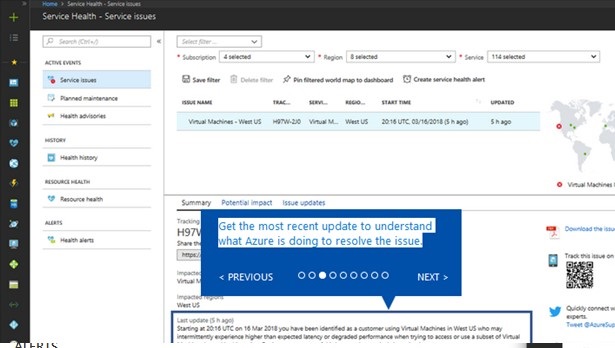
Get the most recent update to understand what Azure is doing to resolve the issue.

Get a link for the issue to use in your problem management system.

Download a PDF summary of the issue to share with people who don’t have access to the Azure portal.

Review the list of your resources that might be impacted by this issue. Export the list and share with your team.

Filter to business-critical subscriptions, regions, and resource types. Save the filter and pin the personalized health tile to your portal dashboard.

Create a service health alert using the same filter to notify you the next time an Azure service issue affects you.

Need additional help with the issue? Contact Azure Support.

