Beyond Prompts: How Microsoft Copilot Cowork is Redefining Teamwork in 2026
For years, we’ve treated AI like a digital vending machine: you put a prompt in, and a piece of content pops out. But as we move through 2026, the “chatbot” era is officially giving way to the agentic era.
Microsoft’s latest breakthrough, Copilot Cowork, represents the biggest shift in the Microsoft 365 ecosystem since the launch of Teams. It isn’t just an assistant you talk to; it’s a collaborator that works with you and your team over hours or days to get complex projects across the finish line.
What Exactly is Copilot Cowork?
Unlike the standard Copilot, which handles “one-and-done” tasks (like summarizing an email), Copilot Cowork is designed for multi-step, long-running workflows. Built on a sophisticated multi-model architecture integrating the reasoning power of Anthropic’s Claude alongside OpenAI’s latest models it functions as a project coordinator that lives inside your workspace.
The Core Difference: Assistance vs. Execution
| Feature | Standard Copilot | Copilot Cowork |
| Duration | Immediate (Seconds) | Long-running (Hours/Days) |
| Scope | Single task (Draft an email) | Complex project (Plan a product launch) |
| Action | Generates content | Orchestrates actions across M365 apps |
| Context | Current file/thread | Full “Work IQ” across SharePoint, Teams, & Mail |
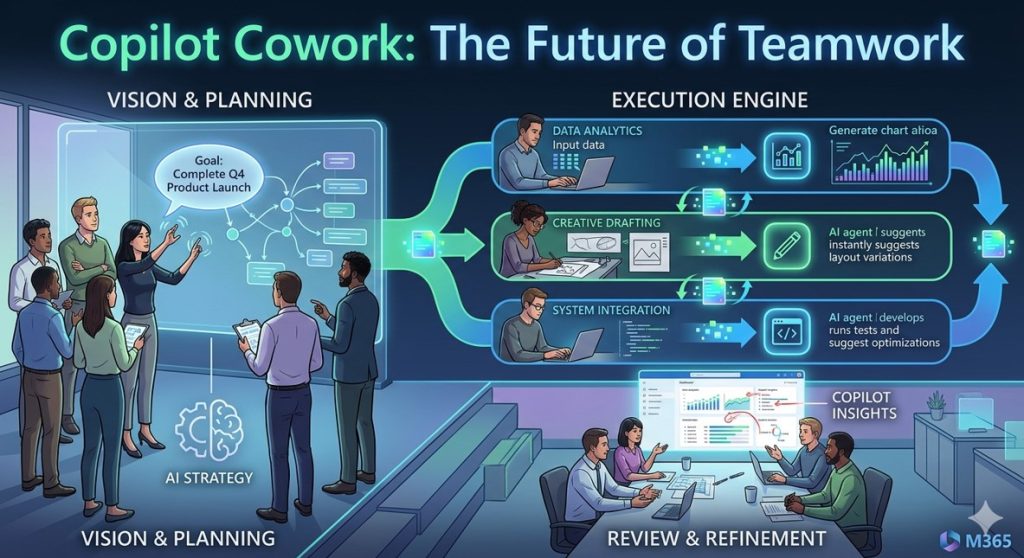
How It Works: The “Plan and Steer” Model
The magic of Cowork lies in its ability to break down a vague goal into a concrete plan. When you give Cowork a high-level objective, it doesn’t just start typing. It:
Creates a Roadmap: It outlines the steps required, such as “Gather budget data from Excel,” “Draft a stakeholder memo,” and “Schedule a review meeting.”
Executes in the Background: You don’t have to stay on the screen. Cowork works through the steps, pulling data from your enterprise environment.
Surfaces Checkpoints: Before it takes a “sensitive” action like sending an email to your boss or posting to a public Teams channel it pauses for your approval.
Real-World Use Cases for 2026
How are teams using this today? Here are a few ways Cowork is changing the daily grind:
Executive Review Prep: Cowork can spend the afternoon pulling the latest sales figures from Excel, cross-referencing them with meeting notes from Teams, and building a 10-slide PowerPoint deck ready for your review by 5:00 PM.
Automated Project Management: Use the Kanban view within Copilot to watch Cowork move tasks from “To Do” to “Done” as it collects signatures, updates spreadsheets, and files reports in SharePoint.
Deep Research & Critique: Using the new Researcher integration, Cowork can synthesize data from multiple sources. One AI model drafts the initial analysis, while a second “Expert Reviewer” model critiques and refines it for accuracy.
Security and Governance: The Enterprise Shield
One of the biggest hurdles for AI in the workplace has been trust. Microsoft has addressed this by ensuring Cowork operates strictly within your Microsoft 365 security boundary.
Important Note: Cowork respects all existing permissions. If a team member doesn’t have access to a specific SharePoint folder, their Copilot Cowork doesn’t either. It uses Work IQ to reason over data you already own, ensuring no data “leaks” outside your organization.
Getting Started
Copilot Cowork is currently rolling out to users in the Frontier program. To see if you have access:
- Open your Microsoft 365 Copilot chat.
- Look for the Cowork icon or toggle.
- Try a multi-step prompt: “Help me prepare for next week’s budget review by analyzing our March spending and drafting a summary for the leadership team.”
The era of the “AI partner” has arrived. It’s time to stop just prompting and start coworking.

